What has the world come to?? Bikers are now yuppies but still bada** enough to kill each other? The irony is beyond me.
http://news.yahoo.com/worst-california-biker-feud-decade-erupted-starbucks-154231726.html


9.27.2011
View Inside the Washinton Monument During the Quake
Atop the Washington Monument During the August 23, 2011 Earthquake.
9.23.2011
Washington Monument Update
The Washington Monument remains closed and may remain so for some time. Washingtonians are expecting an update on Monday. Here is a link to the local story.
http://www.nbcwashington.com/news/local/Washington-Monument-Update-130436998.html

http://www.nbcwashington.com/news/local/Washington-Monument-Update-130436998.html

8.26.2011
Earthquakes and Hurricanes - all in one week
The east coast is livin' la vida loca!! We literally started the week out with a bang and will end it with a fury. With so many monuments and buildings with cracks and structural damage, I don't know what further harm will come to them with high winds and rain. I hope DC only gets a smidgen of the storm. I would hate to see more damage done! Here's hoping all that are in Hurricane Irene's path plan wisely and are able to find safe haven. We are wishing you well, New York, New Jersey, and New England!
Cracks in Washington Monument


Cracks in Washington Monument


8.06.2011
My New Ride
I can't believe I found a scooter so quickly and within my price range. A 2009 Suzuki Burgman 650 Executive with less than 600 miles - practically brand new. Hubby and I are driving down to NC to pick it up next Saturday.


8.03.2011
Crafting Isn't My Only Hobby
I enjoy doing many different things in addition to my papercrafting. I love to read, photography has been a passion since college, traveling in our rv is something my husband and I just don't do enough, and motorcycle riding, to this point a solitary activity, has been one of the most enjoyable and relaxing outdoor activities I've ever done.
Due to health issues, I haven't ridden since 2006, but with recent improvements in my health and continued weight loss (an ongoing process), I am finally feeling as if I can get back on the road again. My husband, who road with me once and said never again, has agreed to riding back roads and our favorites like Skyline Drive and the Blue Ridge Parkway.
Age supposedly brings wisdom, but it also brings loss of stability and other fine motor skills. For safety's sake, we will ride an automatic transmission "super scooter" with a trike kit installed. Specifically, we will ride a Suzuki Burgman 650 Executive with ABS breaks with the Trinity Trike kit installed. The trike kit is being milled from raw aluminum as I type this, and I hope to have it delivered by the end of September for installation. Here is a photo of someone else's ride. Mine may be a different color, not sure yet as I haven't bought the bike.

I hope that John and I will get a couple of rides in this fall before it turns too cool. It should be a hoot to ride! Any other crafters out there ride on two or three wheels? Give me a shout!
http://www.thetrinitytrike.com/CVTcruisers/TriBurg/index.html
http://www.suzukicycles.com/Product%20Lines/Cycles/Products/Burgman%20650/2011/AN650A.aspx
Due to health issues, I haven't ridden since 2006, but with recent improvements in my health and continued weight loss (an ongoing process), I am finally feeling as if I can get back on the road again. My husband, who road with me once and said never again, has agreed to riding back roads and our favorites like Skyline Drive and the Blue Ridge Parkway.
Age supposedly brings wisdom, but it also brings loss of stability and other fine motor skills. For safety's sake, we will ride an automatic transmission "super scooter" with a trike kit installed. Specifically, we will ride a Suzuki Burgman 650 Executive with ABS breaks with the Trinity Trike kit installed. The trike kit is being milled from raw aluminum as I type this, and I hope to have it delivered by the end of September for installation. Here is a photo of someone else's ride. Mine may be a different color, not sure yet as I haven't bought the bike.

I hope that John and I will get a couple of rides in this fall before it turns too cool. It should be a hoot to ride! Any other crafters out there ride on two or three wheels? Give me a shout!
http://www.thetrinitytrike.com/CVTcruisers/TriBurg/index.html
http://www.suzukicycles.com/Product%20Lines/Cycles/Products/Burgman%20650/2011/AN650A.aspx
7.04.2011

6.17.2011
Camper's Near Death Experience - or what we did on our summer vacation

the C R A Z Y D E E R from HELL!

Thinking quickly, he whips out his only weapon, a flashlight and sends his mighty beams into the deer’s eyes in hopes of preventing a charge. The deer didn’t budge. The camper and deer locked eyes. Soon it was clear; the deer thought the camper had stolen its fawn (also known as the camper’s trusted companion).
 Murphy as fawn
Keeping his eyes on the deer, the camper walked backward slowly toward the sanctuary of his RV. The deer continued to stalk the camper until another camper called out and the deer ran away. The brave camper and his trusted companion made their way home safely with quite a “tail” to tell.
So, BEWARE when you go out into the woods. You never know what might be watching YOU!

5.30.2011
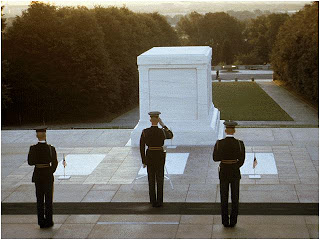
Memorial Day 2011
Today we honor and remember those who gave their lives so that we could enjoy freedoms that we often take for granted. Please take some time today and reflect on our American way of life and the ultimate price so many paid for it.

5.29.2011
Rolling Thunder 2011
Each Memorial Day weekend, hundreds of thousands of motorcyclists converge at our nation's capitol to ride in Rolling Thunder. Started in 1987 to raise awareness of prisoners of war and those missing in action, Rolling Thunder has evolved to an impressive show of patriotism and support for our troops and veterans of all wars. Roll on, brothers and sisters!


5.23.2011
YouTube University

5.21.2011
Sure Cuts A Lot 2.0 - New User Perspective
After realizing that Provo Craft was never going to enable the Cricut Imagine to use stand alone software like it did for the Cricut Expression, I decided to buy an Expression and Sure Cuts A Lot 2.0 (SCAL). I got a great buy on a used Expression on eBay ($63) and SCAL was a very reasonable $60, so my buy-in price wasn't too bad. I had also read on some message boards that the Roland cutting blades were superior to the PC ones, so I bought 5 of those for around $2 per blade on eBay (versus almost $4 for the PC blades). I bought the 60 degree blades although you can easily buy the 45 degree blades (60 degree = PC deep cut blade; 45 degree = PC regular blade). Both sizes fit in the regular blade housing.
Operating the Expression and the Imagine are very different and I was a bit intimidated. Same with SCAL, but I'm not real big on reading manuals at first. I'd rather dig in and try my hand at things and see what I can come up with. My first order of business was to find some files that worked with SCAL. The Internet is a treasure trove of all sorts and getting free graphics is no exception. I found some very nice (FREE) .svg files that would work with SCAL and downloaded to my hearts content.
My first cutting attempts with SCAL were made using my regular card stock and I wasn't very happy with my results. I had to experiment with pressure and blade settings to get things right and then find paper that would release from the cutting mat without making me spend too long struggling to ensure it wouldn't rip. I ended up giving up on my regular stuff and started cutting some pearlized paper end cuts I bought from Paper Works. WOW! Nice crisp cuts, fine details. comes right off the mat. OK, now I'm happy. Here is a picture of a heart. It is made up of three cuts: the base, the heart, and the swirl. I used a glitter pen as an experiment. I usually don't use glitter as it is a no-no for Operation Write Home cards (glitter can put our troops in harms way - 'nuff said).

I then decided to try to print and cut. This is without benefit of reading any directions from the poster of the graphic and template. I would imagine those are available but I'm not even sure where I downloaded the items from, so I had to use trial and error. I cut out the template as-is on my first cut. Boy, that was one big cut and I had the paper in the wrong position - ugh! Then I printed out the graphic. OK, no way they match up! Fortunately, SCAL is very accurate about showing you where your cut will happen on your mat IF you take note of the unique perspective. I don't know if the Expression is always like that but what you see at the top of the screen is NOT what cuts at the top of the page. The Expression's starting point is upper right on the cutting mat and cuts sideways as you look at the mat, so top to bottom is actually right to left. The Imagine's starting point is upper left on the cutting mat and cuts just as if you were reading a book, that is, left to right. Long story a little shorter, I finally came up with this nice printed graphic of a tea cup with flowers and then cut it. I trimmed a little here and there with my craft knife and then glued it to some white card stock that I cut out after making a couple of slight modifications to the template. Here is a photo of the card I made from the tea cup.

First impressions: I'm loving the flexibility of SCAL and the Expression. I'm really glad I have both the Expression and the Imagine. I think I have the best of both worlds. I'm very happy with the added capabilities of the Expression and look forward to exploring those in the future (you'll see my posts on my experiences). Thanks for reading and please come back soon. If you want, go to the bottom of my blog and sign up for the RSS feed. That way you'll know when I've added something new.
Operating the Expression and the Imagine are very different and I was a bit intimidated. Same with SCAL, but I'm not real big on reading manuals at first. I'd rather dig in and try my hand at things and see what I can come up with. My first order of business was to find some files that worked with SCAL. The Internet is a treasure trove of all sorts and getting free graphics is no exception. I found some very nice (FREE) .svg files that would work with SCAL and downloaded to my hearts content.
My first cutting attempts with SCAL were made using my regular card stock and I wasn't very happy with my results. I had to experiment with pressure and blade settings to get things right and then find paper that would release from the cutting mat without making me spend too long struggling to ensure it wouldn't rip. I ended up giving up on my regular stuff and started cutting some pearlized paper end cuts I bought from Paper Works. WOW! Nice crisp cuts, fine details. comes right off the mat. OK, now I'm happy. Here is a picture of a heart. It is made up of three cuts: the base, the heart, and the swirl. I used a glitter pen as an experiment. I usually don't use glitter as it is a no-no for Operation Write Home cards (glitter can put our troops in harms way - 'nuff said).

I then decided to try to print and cut. This is without benefit of reading any directions from the poster of the graphic and template. I would imagine those are available but I'm not even sure where I downloaded the items from, so I had to use trial and error. I cut out the template as-is on my first cut. Boy, that was one big cut and I had the paper in the wrong position - ugh! Then I printed out the graphic. OK, no way they match up! Fortunately, SCAL is very accurate about showing you where your cut will happen on your mat IF you take note of the unique perspective. I don't know if the Expression is always like that but what you see at the top of the screen is NOT what cuts at the top of the page. The Expression's starting point is upper right on the cutting mat and cuts sideways as you look at the mat, so top to bottom is actually right to left. The Imagine's starting point is upper left on the cutting mat and cuts just as if you were reading a book, that is, left to right. Long story a little shorter, I finally came up with this nice printed graphic of a tea cup with flowers and then cut it. I trimmed a little here and there with my craft knife and then glued it to some white card stock that I cut out after making a couple of slight modifications to the template. Here is a photo of the card I made from the tea cup.

First impressions: I'm loving the flexibility of SCAL and the Expression. I'm really glad I have both the Expression and the Imagine. I think I have the best of both worlds. I'm very happy with the added capabilities of the Expression and look forward to exploring those in the future (you'll see my posts on my experiences). Thanks for reading and please come back soon. If you want, go to the bottom of my blog and sign up for the RSS feed. That way you'll know when I've added something new.
5.16.2011
Finding Inspiration
If you are coming from Linda Kaiser's The Paper Boutique, welcome! Linda is very kind in showing a card I made, inspired by the very creative Joy of Obsessed with Scrapbooking.
I've learned a lot from both Linda and Joy and they continue to inspire me to go beyond merely reproducing what they have done. I am always on the lookout for new ideas for card designs as I make cards for Operation Write Home. I really get a great deal of pleasure making cards that troops will send home to family and friends. I had been pushing myself to ship over 100 cards per month. That necessitated some expedition in the card making process. After about 6 months of that, I've reconsidered and decided to not make as many and focus on trying new techniques and materials. I am going to try to make more detailed cards with more elements and layers, some "fussy cuts", and possibly even try my hand at dimensional and pop-up cards. As I work my way through, I'll post the results here. You'll see the good, the bad, and the ugly (well, my pride might not allow me to post the ugliest mess of all, but you get the idea).
I am in the process of learning how to use the Cricut Expression and Sure Cuts A Lot 2.0. As I start experimenting, I'll certainly write about my experiences and how I find working the Expression into my usual workflow of the Cricut Imagine. I hope you will decide to visit again and leave comments about my cards and other projects.
I've learned a lot from both Linda and Joy and they continue to inspire me to go beyond merely reproducing what they have done. I am always on the lookout for new ideas for card designs as I make cards for Operation Write Home. I really get a great deal of pleasure making cards that troops will send home to family and friends. I had been pushing myself to ship over 100 cards per month. That necessitated some expedition in the card making process. After about 6 months of that, I've reconsidered and decided to not make as many and focus on trying new techniques and materials. I am going to try to make more detailed cards with more elements and layers, some "fussy cuts", and possibly even try my hand at dimensional and pop-up cards. As I work my way through, I'll post the results here. You'll see the good, the bad, and the ugly (well, my pride might not allow me to post the ugliest mess of all, but you get the idea).
I am in the process of learning how to use the Cricut Expression and Sure Cuts A Lot 2.0. As I start experimenting, I'll certainly write about my experiences and how I find working the Expression into my usual workflow of the Cricut Imagine. I hope you will decide to visit again and leave comments about my cards and other projects.
5.13.2011
Operation Write Home sends Millionth Card!!

I am so proud to have contributed just a small drop in a rather large bucket. Here's to the next millionth card and beyond!
4.20.2011
May Cards for Operation Write Home
Just finished my small batch of cards for May and will ready them for shipping later today. Here are some pics.


4.06.2011
Web Candy - Nadia's Beautiful Mess
Nadia of Nadia's Beautiful Mess is giving away a Martha Stewart Crafts Elegant Cake Art Cricut cartridge to commemorate reaching 500 follows of her blog. Be sure to click here and follow directions for your chance to WIN!
4.02.2011
Video Explaining Advanced Calibration for Cricut Imagine
Provocraft posted a video that covers several user questions about the Imagine. Among them - advanced calibration. Chris Dodge, beloved by many Imagine owners who frequent the Cricut and Yahoo Imagine message boards, gives a great explanation about how to get the best calibration possible. Enjoy the video!
4.01.2011
Some of my Favorite Blogs
I love to see what other people are doing and creating, probably because I am not very creative myself. I have several blogs that I check every day without fail and thought I would share them with you.
The Paper Boutique http://paperboutique.blogspot.com/ Linda Kaiser does a terrific job of demonstrating projects on her blog. Her written directions are clear and often she shows you how to make a project by means of videos embedded on her blog and on YouTube. Always my first crafting stop with my morning coffee. She also owns an Imagine and is very good about mixing in Cricut Expression and Cricut Imagine projects to keep the creative juices flowing. A must read!
Creative Critterz Imaginations http://imaginecritters.blogspot.com/ Primarily a Cricut Imagine focused site, you will find a stable of design team members who provide ample inspiration for your next big project. One of my top five sites to visit daily.
Everyday Cricut http://www.cricutholiday.com/ A mix of projects for all Cricut machines, Everyday Cricut does a good job of covering the Provocraft water front. Always refreshing and never tired ideas for ways to use the Cricut machine you own. Includes tutorials and "recipes". Another top five site I visit daily.
Capadia Designs http://www.capadiadesign.com/ My go-to site when I need inspiration for design and layout. This lady is an artist working in paper crafts. She freely shares her design ideas. A top five site for my daily blog reading.
Nadia's Beautiful Mess http://nadiasbeautifulmess.blogspot.com/ I enjoy Nadia's site because she focuses so much on the Cricut Imagine. Sometimes all I want to see is what someone else has done with the machine and cartridges I own. Nadia's is a great resource for that. Her blog rounds out my top five blogs to visit each morning.
The Paper Boutique http://paperboutique.blogspot.com/ Linda Kaiser does a terrific job of demonstrating projects on her blog. Her written directions are clear and often she shows you how to make a project by means of videos embedded on her blog and on YouTube. Always my first crafting stop with my morning coffee. She also owns an Imagine and is very good about mixing in Cricut Expression and Cricut Imagine projects to keep the creative juices flowing. A must read!
Creative Critterz Imaginations http://imaginecritters.blogspot.com/ Primarily a Cricut Imagine focused site, you will find a stable of design team members who provide ample inspiration for your next big project. One of my top five sites to visit daily.
Everyday Cricut http://www.cricutholiday.com/ A mix of projects for all Cricut machines, Everyday Cricut does a good job of covering the Provocraft water front. Always refreshing and never tired ideas for ways to use the Cricut machine you own. Includes tutorials and "recipes". Another top five site I visit daily.
Capadia Designs http://www.capadiadesign.com/ My go-to site when I need inspiration for design and layout. This lady is an artist working in paper crafts. She freely shares her design ideas. A top five site for my daily blog reading.
Nadia's Beautiful Mess http://nadiasbeautifulmess.blogspot.com/ I enjoy Nadia's site because she focuses so much on the Cricut Imagine. Sometimes all I want to see is what someone else has done with the machine and cartridges I own. Nadia's is a great resource for that. Her blog rounds out my top five blogs to visit each morning.
3.18.2011
Cricut Imagine Cartridge - Better Together
I as I was preparing to purchase my Cricut Imagine, I purchased some of the original Cricut cartridges that appealed to me. Since receiving my Imagine in September, I've decided to buy only Imagine cartridges and then only the ones that really catch my eye. It seems that am awful lot of the artwork on the cartridges is "cute" in nature and I am not a person that is drawn to the that sort of thing. Not that there is any thing wrong with that but it is just not my taste. That is one of the reasons I was reluctant to buy the Better Together cartridge. It just looked so "cute"! What turned me around was seeing some of the patterns on the cartridge. I saw the cartridge for a good price on sale so I decided to take a chance and buy it. I'm glad I did as it has turned out to be my go-to cartridge lately.
If you look at the digital handbook http://www.cricut.com/res/handbooks/BetterTogether.pdf you will be able to get a good idea of the quality of the patterns. For me, they make great backgrounds for my cards. Even some of the pieces of art and phrases have come in handy. My last batch of cards for OWH was made entirely from this cartridge. Sure made my life easier! I think this cartridge is especially useful to card makers. If you are looking for card shapes, look elsewhere. But if you are looking for a nice assortment of cheerful backgrounds, with coordinating artwork, the Imagine Better Together cartridge is a great choice.
If you look at the digital handbook http://www.cricut.com/res/handbooks/BetterTogether.pdf you will be able to get a good idea of the quality of the patterns. For me, they make great backgrounds for my cards. Even some of the pieces of art and phrases have come in handy. My last batch of cards for OWH was made entirely from this cartridge. Sure made my life easier! I think this cartridge is especially useful to card makers. If you are looking for card shapes, look elsewhere. But if you are looking for a nice assortment of cheerful backgrounds, with coordinating artwork, the Imagine Better Together cartridge is a great choice.
Subscribe to:
Posts (Atom)